Figure Captions (Concept,
Workflow, and Model; Figures 1-1 to 1-7)
 Figure 1-1. Workflow: acquiring data, merging
datasets, generating TIN and TIF file, registering photos and intensity
TIFs, and stratigraphic interpretation. Figure 1-1. Workflow: acquiring data, merging
datasets, generating TIN and TIF file, registering photos and intensity
TIFs, and stratigraphic interpretation.
 Figure 1-2. Diagram of airborne LIDAR and
ground-based LIDAR systems. Figure 1-2. Diagram of airborne LIDAR and
ground-based LIDAR systems.
 Figure 1-3. Comparison of LIDAR to other
remote sensing techniques. Figure 1-3. Comparison of LIDAR to other
remote sensing techniques.
 Figure 1-4. Airborne LIDAR instrument. Figure 1-4. Airborne LIDAR instrument.
 Figure 1-5. Ground-based LIDAR instrument. Figure 1-5. Ground-based LIDAR instrument.
 Figure 1-6. Data processing. Filtered raw data
( point clouds) (1.), generated TIN terrain model (2.), intensity image
(3.), and TIN and intensity combined (3D photo) (4.). Figure 1-6. Data processing. Filtered raw data
( point clouds) (1.), generated TIN terrain model (2.), intensity image
(3.), and TIN and intensity combined (3D photo) (4.).
 Figure 1-7. Merging Figure 1-7. Merging  digital digital terrain model with
photo: original photo (upper left); photo mapped onto intensity TIF
(upper right); both images mapped onto TIN (lower) to form 3D photo
draped model. These images are illustrated in Figures 2-3
and 2-4. terrain model with
photo: original photo (upper left); photo mapped onto intensity TIF
(upper right); both images mapped onto TIN (lower) to form 3D photo
draped model. These images are illustrated in Figures 2-3
and 2-4.
Return
to top.
-
Collect point clouds and
high resolution photographs. Acquire X,Y,Z and Intensity data with
ILRIS 3D and ‘hi-res’ photos simultaneously.
-
Merge point clouds into
single coordinate system. Merge multiple datasets into a single
coordinate system and remove excess overlap.
-
Generate TIN and intensity
TIF image. Generate a TIN from a decimated x,y,z dataset and a TIF
file from the full resolution intensity data.
-
Color-map photo onto TIN.
Register the photograph and intensity TIFs with the newly generated,
unified-coordinate system TIN.
·
Interpretation: Add
stratigraphic interpretation to 3D photo-draped outcrop model.
The
workflow for generating a photo-draped 3D outcrop model used as a
foundation for complex geological models (Figure
1-1) begins with point
cloud data and high-resolution photograph acquisition in the field. Once
the data have been acquired, the individual datasets are merged into a
unified coordinate system in InnovMetric's “Polyworks” software module “IMAlign.”
After a single coordinate system has been defined for all datasets, the
data can be filtered to generate a lower resolution TIN (triangulated
irregular network) surface. The full-resolution intensity data are used
to remove camera distortion from photos and both the photo and the
intensity TIF image are applied as textures to the TIN terrain model.
Finally, stratigraphic interpretations are then added.
This thing called “LIDAR” is an acronym that
describes a method of determining position of a target relative to some
arbitrary reference point (Figure 1-2). LIDAR stands for Light Detection
and Ranging. It was originally used by atmospheric and planetary
geoscientists in the 1960s to image bodies of galactic matter and
atmospheric plumes. LIDAR is Light Detection and Ranging; RADAR is Radio
Detection and Ranging; SONAR is Sound Navigation and Ranging.
LIDAR can be compared to other remote sensing techniques such as SONAR
and RADAR, which also determine the position of distant targets from a
known point.
The
University of Texas at Austin is the only University in the world with
Optech ALTM airborne and ILRIS 3D ground-based LIDAR instruments (Figures
1-3, 1-4, 1-5). The combination of these two instruments enables us
to survey entire cities at up to millimeter point spacing in 3D.
Points and Intensity to Surface Model (Figure
1-6)
Point clouds are “smart-filtered” to eliminate
excessive data overlap and normalize point distribution across the
outcrop surface (1.),
Figure 1-6). This step is extremely important to
minimize file size and keep sufficient detail to accurately represent
the true surface of the outcrop. The filtered x, y, and z data are then
used to generate a TIN terrain model (2.),
Figure 1-6).
A full-resolution intensity image is then
matched to the terrain model. Since the intensity is from the x, y, and
z laser return, it matches exactly to the TIN (3.),
Figure 1-6). The
result is a pseudo-black and white 3D photograph derived from
laser-returned x, y, z and intensity data (4.),
Figure 1-6). Multiple
datasets can be merged into the same coordinate system in InnovMetric’s
Polyworks CAD software without GPS coordinates as long as each image has
sufficient overlap with the previous and next image (10% is more than
enough). Stratigraphic interpretation can begin from this stage using
the intensity data much as one would use a black and white outcrop
photograph.
Digital Terrain Model-Photo Merge (Figure
1-7)
The process of adding a photograph to the x,
y, z, and intensity model uses a “rubber-sheet” rectification technique
(we used ER Mapper for this), where multiple control points are picked
on each photo that correspond to points on an intensity image (Figure
1-7). Between 30 and 60 control points are used depending on the terrain
complexity. Picking control points is fast and easy since the photo and
the intensity image are acquired at the same time from the same vantage
point. To generate a true 3D effect, we use angular variance normal to
the dataset origin to define a best-fit image to color-map to the x, y,
z pixels. For example, if the user wants to display all faces > 90
degrees from the normal to the TIN face with color pixels from image 1
and all faces from < 90 degrees with color pixels from image 2, this can
be done using a “normal gate” as follows:
If (q>90)
then C = Image1; if
q<90 then C = Image2
Where
q =
viewers perspective angle with reference to face normal and
C = color pixels to be mapped.
The technique allows us to map multiple images
onto a single surface resulting in a full 3D textured surface. The
textured surface is now optimized to any viewer perspective allowing the
viewer to “see” around corners with full resolution. This technique also
reduces “doubling up” of images from multiple perspectives and thereby
reduces rendering time.
Return
to top.
Figure Captions (Deep-Water Clastic Case
Studies; Figures 2-1 to 3-8)
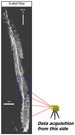 Figure 2-1. Map view of Ainsa 2 outcrop,
showing the general outcrop trend. Figure 2-1. Map view of Ainsa 2 outcrop,
showing the general outcrop trend.
 Figure
2-2. Standard 35 mm photo mosaic (upper) and merged ILRIS 3D x, y, z,
and intensity image (lower), looking from the same vantage point.
Detail of area outlined by blue rectangle is shown in
Figure 2-3. Figure
2-2. Standard 35 mm photo mosaic (upper) and merged ILRIS 3D x, y, z,
and intensity image (lower), looking from the same vantage point.
Detail of area outlined by blue rectangle is shown in
Figure 2-3.
 Figure 2-3. Intensity images of that part of
Ainsa 2 outcrop outlined (blue) in Figure
2-2;
intensity TIF combined
with original photo, and photo mapped onto intensity TIF, combined with
x, y, z TIN, to yield 3D photo draped model. The green pixels in the
intensity images are keyed to a linear cutoff of intensity values coded
to display as green. Detail of area within red rectangle is shown in
Figure 2-4. Figure 2-3. Intensity images of that part of
Ainsa 2 outcrop outlined (blue) in Figure
2-2;
intensity TIF combined
with original photo, and photo mapped onto intensity TIF, combined with
x, y, z TIN, to yield 3D photo draped model. The green pixels in the
intensity images are keyed to a linear cutoff of intensity values coded
to display as green. Detail of area within red rectangle is shown in
Figure 2-4.
 Figure 2-4. Enlargement of part of 3D photo
draped model in Figure 2-3. Figure 2-4. Enlargement of part of 3D photo
draped model in Figure 2-3.
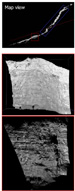 Figure 2-5. The two images illustrate
perspective correction possibilities with use of LIDAR, along with index
map of Ainsa quarry. Figure 2-5. The two images illustrate
perspective correction possibilities with use of LIDAR, along with index
map of Ainsa quarry.
 Figure 2-6. Photo mosaic (upper) taken from
the same perspective in Ainsa quarry as the ILRIS 3D data (lower). Figure 2-6. Photo mosaic (upper) taken from
the same perspective in Ainsa quarry as the ILRIS 3D data (lower).
 Figure 2-7. Images of the same outcrop as that
in Figure 2-6. Upper image is from ultra-light aircraft. Lower image is
from the same ILRIS 3D dataset as in Figure
2-6,
tilted to adjust the
perspective. Figure 2-7. Images of the same outcrop as that
in Figure 2-6. Upper image is from ultra-light aircraft. Lower image is
from the same ILRIS 3D dataset as in Figure
2-6,
tilted to adjust the
perspective.
 Figure 3-1. Point clouds assembled for a
Permian deep-water, confined, channel complex in Guadalupe Canyon, West
Texas. Figure 3-1. Point clouds assembled for a
Permian deep-water, confined, channel complex in Guadalupe Canyon, West
Texas.
 Figure 3-2. Another view of the stratigraphic
section in Guadalupe Canyon containing the channel complex--to
illustrate that ILRIS 3D acquires image data in a direct line of sight. Figure 3-2. Another view of the stratigraphic
section in Guadalupe Canyon containing the channel complex--to
illustrate that ILRIS 3D acquires image data in a direct line of sight.
 Figure 3-3. A third view of the stratigraphic
section in Guadalupe Canyon with channel complex, with a part of it
outlined for enlargement (Figure
3-4). Figure 3-3. A third view of the stratigraphic
section in Guadalupe Canyon with channel complex, with a part of it
outlined for enlargement (Figure
3-4).
 Figure 3-4. Blown-up image of the “100-foot
Channel” point-cloud dataset, along with close-up view of individual x,
y, z, and intensity points displayed with a grayscale color bar. Figure 3-4. Blown-up image of the “100-foot
Channel” point-cloud dataset, along with close-up view of individual x,
y, z, and intensity points displayed with a grayscale color bar.
 Figure 3-5. Solitary Channel outcrop, Southern
Spain. Left--colors are used to show individual datasets; right--same
image displayed with intensity of each x, y, and z point in grayscale. Figure 3-5. Solitary Channel outcrop, Southern
Spain. Left--colors are used to show individual datasets; right--same
image displayed with intensity of each x, y, and z point in grayscale.
 Figure 3-6. Conglomeratic channel fill,
Solitary Channel, Southern Spain. Photo (upper left); ILRIS 3D intensity
image (upper right); Same intensity image draped onto the TIN digital
terrain model (lower right). Figure 3-6. Conglomeratic channel fill,
Solitary Channel, Southern Spain. Photo (upper left); ILRIS 3D intensity
image (upper right); Same intensity image draped onto the TIN digital
terrain model (lower right).
 Figure 3-7. Solitary Channel outcrop, Southern
Spain: photograph, images, and block diagram. Figure 3-7. Solitary Channel outcrop, Southern
Spain: photograph, images, and block diagram.
 Figure 3-8. Block diagram and image of
Solitary Channel outcrop in three fault blocks. Figure 3-8. Block diagram and image of
Solitary Channel outcrop in three fault blocks.
Ainsa, Northern Spain (Photo Drape)
The map view of the Ainsa 2 outcrop (Figure
2-1) shows the general outcrop trend were data were acquired. They were
acquired with ILRIS 3D from the east side. For comparison, a standard 35
mm photo mosaic and a merged ILRIS 3D x, y, z, and intensity image
looking from the same vantage point, are displayed together in Figure
2-2. Note the poor intensity returns from vegetation. These can be used
to assist in the composition of vegetation removal algorithms.
The Ainsa deep-water sandstone outcrop from
Northern Spain was selected to demonstrate the minimum level of
resolution currently being achieved at the Jackson School of Geosciences
at the University of Texas at Austin. The green pixels in the intensity
images (Figure 2-3) are keyed to a linear cutoff of intensity values
coded to display as green. Combining the image RGB and Intensity image
improves the ability for us to remove vegetation without loosing
valuable geological details. It also opens up the potential to use gated
logic statements to filter out unwanted data or enhance desired data,
like sand to shale ratios.
Intensity TIF +
Original photo = Photo mapped onto intensity TIF Photo
mapped onto intensity TIF
Photo mapped onto intensity TIF + X, Y,
Z TIN = 3D photo draped model 3D photo draped model
Ainsa Quarry, Northern Spain (Variable
Perspective)
The two images in Figure 2-5 illustrate
perspective correction possibilities when using LIDAR. The photo mosaic
(Figure 2-6) was taken from the same perspective as the ILRIS 3D data in
Figure 2-6. The images in Figure 2-7 show the same outcrop as taken from
an ultra-light aircraft and the same ILRIS 3D dataset tilted to adjust
the perspective.
Brushy Canyon Formation, West Texas
(Sand-Shale Discrimination)
Point clouds are assembled directly from
individual x, y, z, and intensity data downloaded from ILRIS 3D (Figures
3-1, 3-2-3-3,
3-4). These data were acquired by the Bureau of Economic
Geology and Optech in May, 2001, at an average spot spacing of 7 cm. The
data acquisition of each of these datasets was approximately 15 minutes.
These data are from a Permian deep-water, confined, channel complex (the
“100 foot Channel” from former Exxon terminology) in Guadalupe Canyon,
West Texas. In this example, the intensity values at each x, y, and z
location are good sandstone-shale indicators. Simple intensity
classification can yield instant net to gross relationships as well as
vertical and horizontal sand bed continuity.
The scans in Figures
3-1, 3-2, 3-3,
3-4 are
displayed in order to demonstrate that ILRIS 3D operates nearly
identically to a conventional camera in so much as ILRIS 3D acquires
image data in a direct line of sight. Therefore, data shadows may exist
in areas where ILRIS cannot “see” from a single vantage point. In order
to complete a full 3D model (eg. no data shadows), multiple datasets are
required from multiple vantage points with some degree of overlap. ILRIS
data may be processed with software that enables the user to pick one or
several control points on various overlapping images to be merged (we
use Polyworks by InnovMetrics). The data within the overlap-region are
used to iterate to a minimum-3D-spatial error using hundreds of
thousands of data points without the need for GPS (commonly iterate to
0.00000001 meters).
Return
to top.
Solitary Channel, Southern Spain
(3-Dimensionality Across Multiple Fault Blocks)
In Figure 3-5, each color indicates an
individual dataset used to reconstruct the Solitary Channel, outcrop.
For comparison, the same image displayed also in Figure 3-5 with
intensity of each x, y, and z point in grayscale.
Figure 3-6 displays this tractional,
conglomeratic channel fill by means of a photograph, an ILRIS 3D
intensity image, and the same intensity image draped onto the TIN
digital terrain model. The model enables the user to extract real
dimensional data from the outcrop preserving spatial integrity of the
deposit.
The Solitary Channel Outcrop in Southern Spain
(Figures 3-5, 3-6,
3-7, 3-8) is an excellent
mixed-conglomeratic/sandstone outcrop analogous to many clastic, West
African, deep-water reservoirs. Understanding reservoir geometry and
continuity at the sub-seismic scale can be accurately quantified through
the use of dimensional data of well-exposed outcrops like this one. One
the first questions the Solitary Channel outcrop presents us, however,
is “What is horizontal?” With the aid of ILRIS 3D data, quantifying
local and regional dip as well as steepness of channel incision can be
accomplished. A second question is “How can we back out the
post-depositional, structural modifications to this system to more fully
understand the original bedding architecture?” Our ability to address
questions like these quantitatively in the past required enormous
investments in time and equipment to acquire even low resolution
datasets. Merging the data into a single coordinate system required the
use of GPS and the data processing time took months or even years before
a usable geologic model could be achieved. Even then, most of the detail
of the system was lost along the way. This entire outcrop was scanned at
10 cm or greater resolution (several 1 cm resolution windows were
acquired for added detail in particularly difficult sections to
correlate) in 2.5 days with two geologists. An additional 1 day with one
geologist was required to merge all datasets (on a standard laptop in
the field) into a single coordinate system exported and ready for
stratigraphic interpretation.
 Figure 4-1.
Digital elevation model of the Sierra Diablo Mountains, West Texas, with
outline of the mouth of Victorio Canyon (Figure 4-2). Figure 4-1.
Digital elevation model of the Sierra Diablo Mountains, West Texas, with
outline of the mouth of Victorio Canyon (Figure 4-2).
 Figure 4-2.
Victorio Canyon, with outline of the area of the north-facing canyon
wall that was scanned. Figure 4-2.
Victorio Canyon, with outline of the area of the north-facing canyon
wall that was scanned.
 Figure 4-3.
Photograph of the north-facing canyon wall, Victorio Canyon, where data
were acquired in February, 2002. Figure 4-3.
Photograph of the north-facing canyon wall, Victorio Canyon, where data
were acquired in February, 2002.
 Figure 4-4.
Cross-section of Lower Permian slope and toe slope deposits in
north-facing wall of Victorio Canyon. Figure 4-4.
Cross-section of Lower Permian slope and toe slope deposits in
north-facing wall of Victorio Canyon.
 Figure 4-5. Victorio Canyon north-facing
canyon wall. Traditional photo pan interpretation (upper) and ILRIS 3D
point cloud dataset (lower).
Detail of area in green rectangle is shown in
Figure 4-6.
Figure 4-5. Victorio Canyon north-facing
canyon wall. Traditional photo pan interpretation (upper) and ILRIS 3D
point cloud dataset (lower).
Detail of area in green rectangle is shown in
Figure 4-6.
 Figure 4-6. Images from area of Victorio
Canyon shown in Figure 4-5. Those in yellow and green boxes are moderate
resolution TIN and intensity images generated from the ILRIS point cloud
data. The inset box shows transition between TIN and point cloud and
detail of the green “coded” vegetation. Figure 4-6. Images from area of Victorio
Canyon shown in Figure 4-5. Those in yellow and green boxes are moderate
resolution TIN and intensity images generated from the ILRIS point cloud
data. The inset box shows transition between TIN and point cloud and
detail of the green “coded” vegetation.
Upper Hueco - Clear Fork Formations, West
Texas: (Basin Geometry)
Shown on a digital elevation model of the
Sierra Diablo Mountains (Figure 4-1) is the mouth of Victorio Canyon,
where good outcrops of the Upper Hueco through Clear Fork Formations on
both north- and south-facing canyon walls. The focus for this study is
the area of north facing wall (blue box in Figure
4-2). It was scanned
using Optech Laser Imaging’s ILRIS 3D ground-based LIDAR instrument in
February, 2002 (Figure 4-3). The cross-section in
Figure 4-4 illustrates
slope and toe of slope deposits (late Wolfcampian through early
Leonardian) Victorio Canyon, West Texas, that crop out along the
north-facing wall of Victorio Canyon.
The images in Figure 4-5 illustrate both the
photo pan and the ILRIS 3D LIDAR scan of the north facing wall of
Victorio Canyon. The photo pan has stratigraphic interpretation in red,
white and yellow whereas the ILIRS 3D point cloud does not. The transfer
of these data from the photo pan onto the ILRIS 3D point cloud are
currently in progress and are beginning to unravel new stratigraphic
relationships previously undocumented with regard to three
dimensionality of the exposure in Victorio Canyon. A complete model of
the Sierra Diablo Mountains (Upper Hueco through Clear Fork Formations)
is also in progress; the Victorio Canyon outcrop being the first of the
batch.
The images in yellow and green boxes in Figure
4-6 are moderate resolution TIN and intensity images generated from the
ILRIS point cloud data. The green coloration in these images is a
linear, intensity cutoff indicating vegetation. Once photographs are
applied to these data, red, green, blue, and intensity “attributes” can
be used to aid in mapping various stratigraphic units. The yellow inset
box shows the transition between TIN and point cloud and a close-up of
the green “coded” vegetation.
Figure Captions (Long-Range Goals, Looking Forward; Figures 5-1 to
5-5)
 Figure 5-1. Workflow: acquiring data, merging
datasets, generating TIN and TIF file, registering photos and intensity
TIFs, and stratigraphic interpretation, with the “so what” geological
model. Figure 5-1. Workflow: acquiring data, merging
datasets, generating TIN and TIF file, registering photos and intensity
TIFs, and stratigraphic interpretation, with the “so what” geological
model.
 Figure 5-2. Photograph of the operation of a
ground-based LIDAR instrument. Figure 5-2. Photograph of the operation of a
ground-based LIDAR instrument.
 Figure 5-3. Image of the greater Austin area
surveyed in early 2000, showing a 0.5 meter DEM color coded to
elevation. Figure 5-3. Image of the greater Austin area
surveyed in early 2000, showing a 0.5 meter DEM color coded to
elevation.
 Figure 5-4. An IKONIS satellite image (one
meter resolution) of the UT campus draped over the ALTM DEM shown in
Figure 5-3. (courtesy of the Center for Space research). Figure 5-4. An IKONIS satellite image (one
meter resolution) of the UT campus draped over the ALTM DEM shown in
Figure 5-3. (courtesy of the Center for Space research).
 Figure 5-5. A larger scale window of the
intersection in the foreground of the image in Figure 5-4. Figure 5-5. A larger scale window of the
intersection in the foreground of the image in Figure 5-4.
Long-Range Research Goals at the Bureau of Economic Geology
-
Collect point clouds and
high resolution photographs. Acquire X,Y,Z and Intensity data with
ILRIS 3D and ‘hi-res’ photos simultaneously.
-
Merge point clouds into
single coordinate system. Merge multiple datasets into a single
coordinate system and remove excess overlap.
-
Generate TIN and intensity
TIF image. Generate a TIN from a decimated x,y,z dataset and a TIF
file from the full resolution intensity data.
-
Color-map photo onto TIN.
Register the photograph and intensity TIFs with the newly generated,
unified-coordinate system TIN.
-
Geological model.
Summary
Ground based LIDAR (Figure
5-2) is a tool that
provides geologists a quick, accurate, quantitative tool to better
understand stratigraphic relationships at the sub-seismic scale. The use
of an instrument that can easily lend high resolution photographic
integration combines the old and the new as far as outcrop analysis
goes. In order to build more accurate reservoir models, we need to
acquire more accurate data from which to build reservoir models. LIDAR
provides a safe, fast, effective, and inexpensive method of gathering
enormous amounts of highly accurate data with a minimum of “down time”
between acquisition and generation of a geological model.
Photo-pan geology has worked well for us in
the past, much in the way that 2D seismic worked for us in the past and
still has its place in our geological tool box. It seems clear, however,
that, like the advent of 3D seismic, 3D outcrop photographic modeling is
the next logical step to quantify what we see in order to better select
analogs for what we cannot see in the subsurface. 3D imaging and digital
outcrop analysis are becoming as critical as the Brunton compass and the
hand lens. The more quantitative we can be in our understanding of
depositional systems, the better we will become at predicting ahead of
the bit with more unknowns due to fewer wells, fewer cores, and deeper
targets. In undrilled basins one of our strongest tools is still a solid
outcrop analog to predict what we cannot see in the seismic.
Airborne and Ground Based LIDAR Integrated
Digital Elevation Models
The image in Figure 5-3 is of the greater
Austin area surveyed in early 2000 showing a 0.5 meter DEM color coded
to elevation. Figure 5-4 (courtesy of the Center for Space research) is
an IKONIS satellite image (one meter resolution) of the UT campus draped
over the ALTM DEM (Figure 5-3). The image in
Figure 5-5 is a larger
scale window of the intersection in the foreground of Figure
5-4. The
detail of the sides of buildings and data beneath underpasses is missing
from airborne photos and surveys because they are line of sight
instruments that cannot see under objects they can not fly under. The
utility of a ground-based instrument (especially one with mm resolution)
can clearly be understood from the limitations airborne only surveys
encounter. A distant hope is the eventual integration of multi-or
hyper-spectral scanners for ground surveys at high resolution and
moderate cost.
We are currently in the process of writing programs that allow us to
process these types of data at a higher resolution faster, cheaper,
and more accurately. The primary limitation with LIDAR research is
hardware and software availability. There are few, if any, “off the
shelf” software packages that are capable of handling tens of gigabytes
of 3D data smoothly. Any comments or suggestions are more than welcome
one this topic or anything related to this presentation. Please contact
the senior author at his email address ([email protected])
Return
to top.
|

 Print this page